
Convert Handwritten Notes to Text in Seconds
Upload a photo. Get clean, organized text. That's it. No credit card, no subscriptions.
Try Free (5 scans)Free to try: 1 daily scan. Upgrade with a simple one-time top-up when you need more.
Perfect for tradies, students, founders — anyone who needs to convert job sheets, notebooks, or quick scribbles into digital text.
Why waste time typing handwritten notes?
Manual Typing
- Hours of typing
- Human errors
- No formatting
- Time-consuming
- Expensive
SupaScans
- Seconds to convert
- AI error correction
- Clean, organized text
- Simple & fast
- 1 free daily scan
How to Convert Handwritten Notes to Text
- 1Upload your handwritten notes, job sheets, or photos
- 2AI reads your handwriting and extracts clean text
- 3Copy, download, or paste into your tools
- 4Done. Save hours of manual typing
What We Convert
What's the Best Way to Convert Handwritten Notes to Text?
The easiest way to convert handwritten notes to text is to use an online handwriting OCR tool like SupaScans. You simply upload a photo or scan of your notes, and the tool reads your handwriting and turns it into editable digital text.
Because SupaScans is designed specifically for handwritten notes, job sheets, and everyday scribbles, it's more accurate than most generic document scanners for this type of work. You get AI-powered error correction and organized formatting — not just raw OCR output.
See Handwritten Notes Turned into Text
Real examples of handwriting to text conversion
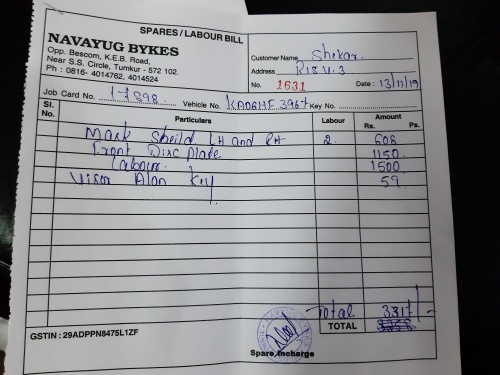
Job Sheet Example
Before (Handwritten):
After (Clean Text):
NAVAYUG BYKES - SPARES/LABOUR BILL
Date: 13/11/19 | Bill No: 1631 | Job Card: 17898
Vehicle: KA04GHE 3967
Particulars:
• Mark Shield LH and RH (Qty: 2) — 608 Rs.
• Front Disc Plate — 1150 Rs.
• Labour — 1500 Rs.
• Visor Allen key — 59 Rs.
Total: 3317 Rs.
GSTIN: 29ADPPN8475L1ZF
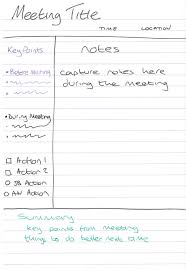
Meeting Notes Example
Before (Handwritten):
After (Clean Text):
Meeting Title
Time: [time] | Location: [location]
Key Points:
- • Before Meeting
- • During Meeting
Actions:
- ☐ Action 1
- ☐ Action 2
- ○ JS Action
- ○ AN Action
Notes:
Capture notes here during the meeting
Summary:
Key points from meeting. Things to do better next time.
SupaScans is built for real handwriting — not just neat demo samples.
Why Use SupaScans for Handwritten Notes?
Built for handwriting, not printed documents
| Feature | SupaScans | Google Lens | Basic OCR |
|---|---|---|---|
| Built for handwriting? | ✅ Yes, tuned for scribbles | ⚠️ Sort of | ❌ No |
| Job sheets & forms | ✅ Works well | ⚠️ Hit and miss | ❌ Often messy |
| Error correction | ✅ AI cleanup | ⚠️ Basic | ❌ Minimal |
| Runs in browser | ✅ Yes | ❌ Needs app | ⚠️ Varies |
| Free to try | ✅ 1 daily scan | ✅ Yes | ⚠️ Limited |
If your main need is turning handwritten notes into text, SupaScans is built for exactly that.
Frequently Asked Questions
How do I convert handwritten notes to text online?
Upload a clear photo or scan of your notes into SupaScans, click convert, and you'll get digital text you can copy, edit, or save. There's no software to install and you can try it free in your browser.
Will SupaScans work with messy handwriting?
SupaScans is designed for real-world handwriting — not just neat demo writing. If a human can roughly read it, there's a good chance SupaScans can turn it into usable text. Very extreme scribbles may still be tricky, but you'll usually get a solid starting point.
Is SupaScans free to use?
You get 1 free daily scan with a simple account — no credit card needed. From there, you can decide if you want to buy a scan pack for your ongoing handwritten notes and job sheets.
Is my data safe when I upload handwritten notes?
Your uploads are processed securely and temporarily. We don't store your images or use them for training. Text results are tied to your account so you can access them, and you can delete them anytime.
What kinds of handwritten notes does SupaScans handle best?
SupaScans works well for job sheets, checklists, notebooks, meeting notes, rough planning, and everyday scribbles. The clearer the photo and writing, the cleaner your text result will be.
Ready to save hours of typing?
Try free: 1 daily scan. No credit card required. Upgrade packs are one-time payments.
Try Free (5 scans)